Game Collection Manager for PC Libraries
Use Kolektor as a Windows game collection manager for installed PC libraries today, with digital and physical collection tools on the roadmap.
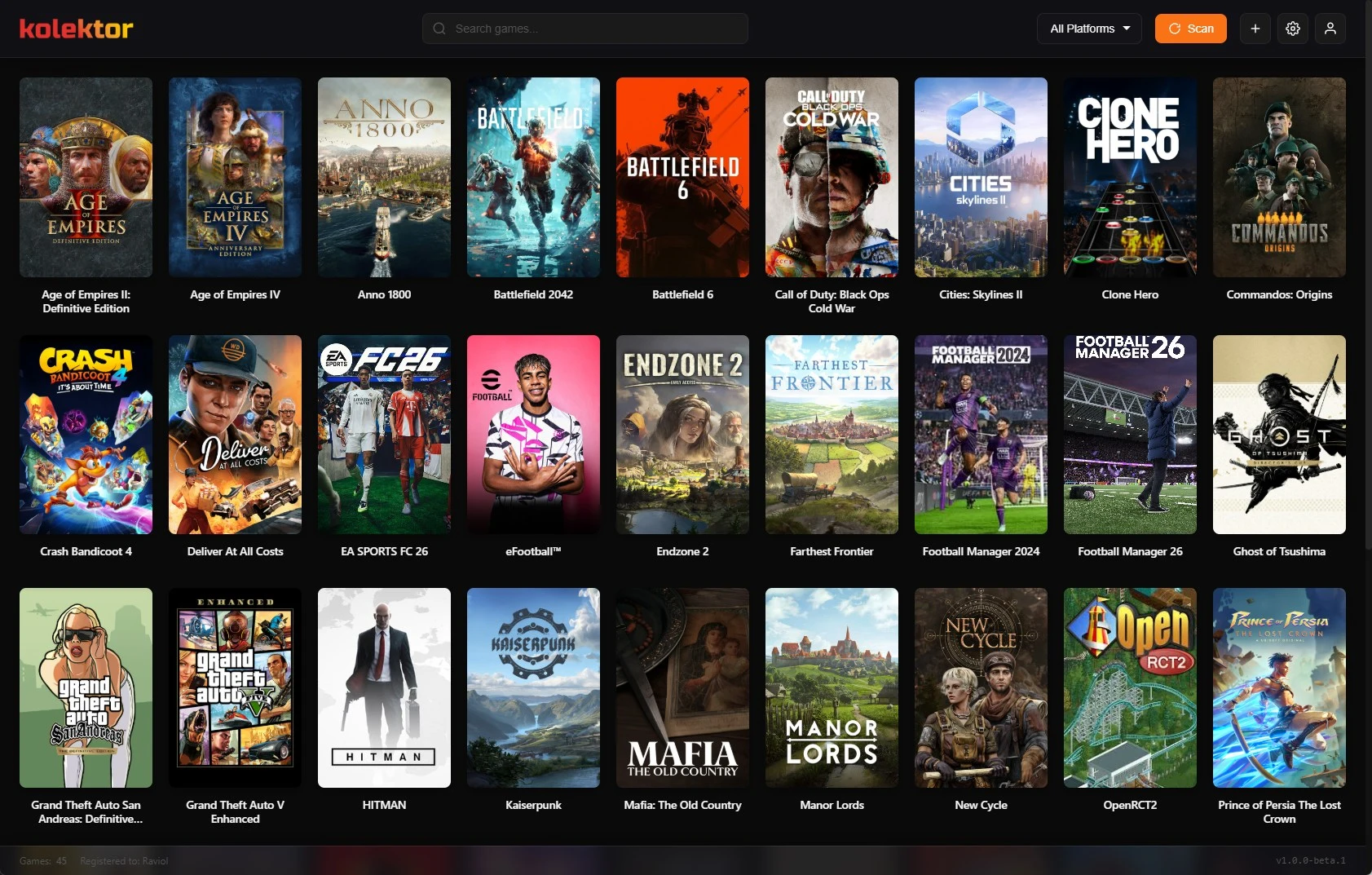
A PC game collection manager should help you answer one simple question: what do I own, what is installed, and what can I play now? Kolektor is a Windows game launcher and collection manager built around that daily library problem. Today, Kolektor supports installed digital games across major PC platforms; we are working on deeper digital and physical collection tools next.
What A PC Game Collection Manager Should Do
A launcher opens games. A collection manager helps you understand the library around those games. For PC players, those two jobs overlap because the practical collection is often split across stores, drives, launchers, installers, subscriptions, and manual folders.
We built Kolektor from the launcher side first because that is the most useful starting point. If a tool cannot find the games already installed on your Windows PC, it is hard to trust it with a larger collection later. The first job is to make your playable library visible.
For a real PC setup, a useful game collection manager should cover these jobs:
| Job | Why it matters | How Kolektor handles it today |
|---|---|---|
| Find installed games | Your collection is scattered across platform folders and drives | Kolektor supports automatic detection across 8 major PC platforms |
| Show one browseable library | You should not need to remember which store owns each game | Kolektor puts detected games into one visual library |
| Keep games recognizable | Large libraries need covers, metadata, and details, not only file names | Kolektor beta 4 added IGDB metadata, game details, screenshots, and trailers |
| Launch from one place | Organization is only useful if it gets you into the game | Kolektor supports one-click launch and launch preferences where available |
| Handle exceptions | Not every game comes from a store or clean manifest | Kolektor supports manual games and custom entries |
| Grow into collection tracking | Collectors need more than an installed-games grid | Full Library Sync and Digital Collection Tools are in progress; physical catalog features are planned |
That mix is important. A collection manager that only catalogs uninstalled ownership can feel detached from what you actually play. A launcher that only starts executables can feel shallow once your library grows. Kolektor is designed to connect both sides over time.
Start with the installed games on your Windows PC, then use Kolektor as the base for a cleaner collection workflow.
Try Kolektor FreeWhere Kolektor Starts Today
Kolektor’s current free launcher experience focuses on installed digital games. The Windows app supports Steam, Epic Games Store, GOG, Ubisoft Connect, EA App, Xbox/Game Pass, Battle.net, and Amazon Games. It also supports manual games for titles that live outside normal store detection.
That installed-first approach is intentional. Your full account history can be huge, noisy, and partly irrelevant to what you can play tonight. Installed games are the active layer of the collection. They are on the machine, taking up space, waiting to be played, replayed, finished, hidden, fixed, or removed.
Kolektor gives that active layer one home. Instead of opening several launchers to remember what is on the PC, you can open one library and scan across platforms. Platform badges, cover art, metadata, search, filters, and game details make the library easier to read.
The original platforms still matter. Steam, Epic Games Store, GOG, Ubisoft Connect, EA App, Xbox/Game Pass, Battle.net, and Amazon Games remain responsible for purchases, installs, updates, subscriptions, account state, cloud saves, and platform-specific repair work. Kolektor is the unified library and launch layer built on top of that reality.
Why Installed-First Still Helps Collectors
Collectors often care about ownership, editions, backlog, play state, physical shelves, and long-term records. Those are bigger jobs than launching installed games. But installed games are still the cleanest place to start because they reveal the real state of the PC.
An installed-first library helps you:
- See which games are actually ready to play.
- Find duplicate attention across different stores.
- Notice games you installed and forgot.
- Keep standalone or manually installed games visible.
- Use cover art and details to remember what a game is.
- Launch from one place instead of jumping between platform apps.
This matters even if your eventual goal is a complete collection database. A complete collection can include things you own, things you installed, things you finished, things you lent out, things you want to buy, and things you keep physically. Those are different states. Kolektor starts by making the installed state usable, then expands toward richer collection states.
A Practical Kolektor Workflow For PC Collections
If your library is already messy, do not start by trying to catalog everything manually. Start with the games the PC can prove are installed.
- Install Kolektor on Windows.
- Let Kolektor scan supported platforms.
- Review the unified game grid.
- Use search and platform filters to check what appeared.
- Add missing standalone games manually.
- Open game details for titles where metadata helps you decide what to play.
- Use one-click launch from Kolektor when you are ready to play.
- Keep the original platform apps for installs, updates, repairs, subscriptions, and account work.
This workflow avoids the most common collection-manager trap: spending hours building a perfect database before the tool helps you. Kolektor should become useful quickly, then give you more reasons to maintain the library over time.
The manual add path matters here. PC collections often include itch builds, fan projects, modded versions, portable installs, demos, old discs, emulators, and tools that do not live inside a major store. We are not treating those as edge cases to ignore. Manual games are part of making one library feel like your actual library.
How Metadata Turns A Launcher Into A Collection Surface
A plain list of titles is not enough for a large collection. Titles can be vague, duplicated, abbreviated, or hard to remember years later. Cover art and metadata make a game recognizable again.
Kolektor beta 4 added IGDB integration for cover art and rich metadata, plus a New Game Details panel. That gives the collection more context than a folder scan alone. A game card can become a real entry with visual identity and supporting information.
Kolektor also supports screenshots and trailers in the game details experience. That is useful for collection browsing because the question is often not “can I launch this?” The question is “do I remember why I installed this, and do I want to play it now?”
For collectors, metadata also creates a foundation for future organization. Genres, release context, descriptions, media, and richer details can support smarter ways to group and review games as the product grows.
What We Are Working On Next
Kolektor is not finished at the launcher layer. We are building toward a broader collection manager, and the public roadmap separates what is available now from what is in progress and what is planned.
| Collection feature | Current status | What it means |
|---|---|---|
| Full Library Sync | In progress | See all your games, not just installed ones, by syncing with platform APIs |
| Digital Collection Tools | In progress | Collections, game states, backlog, completion status, and progress tracking |
| Custom Collections | Planned | Organize games into custom groups and folders |
| Lists & Tags | Planned | Add personal labels and create more flexible lists |
| Backlog Tracking | Planned | Track what you want to play, what you are playing, and what you finished |
| Wishlist | Planned | Keep track of games you want to buy or add |
| Physical Collection | Planned | Catalog cartridges, discs, and special editions |
| Barcode Scanner | Planned | Add physical games faster by scanning barcodes |
| Assets Collection | Planned | Track consoles, controllers, collectibles, and gaming memorabilia |
| Loans Tracking | Planned | Keep track of games you lend out |
We are careful about the wording here because these are different product states. The core launcher is available now. Full Library Sync and Digital Collection Tools are in progress. Physical collection features, barcode scanning, loans, assets, and deeper collection stats are planned.
If you only need a lightweight launcher today, Kolektor already has a useful job. If you are a collector waiting for digital and physical collection management, the current launcher is the foundation we are building from.
What Belongs In Kolektor And What Stays In Store Apps
A good collection workflow needs honest boundaries. Kolektor should not pretend to own jobs that belong to the store or platform where a game was purchased.
Use the original platform for:
- Buying games.
- Claiming subscription or store titles.
- Installing and uninstalling games.
- Updating games.
- Account, entitlement, cloud save, and repair actions.
- Platform-specific settings.
Use Kolektor for:
- Seeing installed games from supported PC platforms in one library.
- Searching across that installed library.
- Launching games from a single surface.
- Adding standalone games manually.
- Browsing cover art, metadata, screenshots, trailers, and game details.
- Building toward a richer digital and physical collection workflow.
That split keeps the product useful without making unrealistic promises. Kolektor does not need to replace every store app to be valuable. It needs to make your library easier to see, understand, and play from one place.
When Kolektor Is The Right Fit
Kolektor is a strong fit if your PC games are spread across several launchers and you want one cleaner daily library. It is also a good fit if you are starting to think like a collector and want a tool that begins with playable digital games but is moving toward broader collection management.
It is especially useful if:
- You have games installed across multiple PC platforms.
- You forget which launcher owns which game.
- You want visual browsing instead of store-by-store searching.
- You have standalone games that deserve a place beside store games.
- You want metadata and game details in the same product as launching.
- You care about future digital and physical collection features.
It is not a replacement for every platform account or store client. You should still use those apps for platform-specific work. Kolektor is the library layer that helps your PC game collection feel less scattered.
FAQ
Is Kolektor a game launcher or a collection manager?
Kolektor is both, starting with the launcher. The current Windows app focuses on installed digital games, one-click launch, automatic detection, metadata, and game details. We are working toward deeper digital and physical collection management.
Does Kolektor show all games I own?
Kolektor’s current free launcher experience focuses on installed games. Full Library Sync is in progress for seeing all games, not only installed ones.
Can Kolektor manage physical games?
Physical Collection and Barcode Scanner features are planned. Today, Kolektor is focused on digital PC games and the launcher foundation.
Which platforms does Kolektor support today?
Kolektor supports Steam, Epic Games Store, GOG, Ubisoft Connect, EA App, Xbox/Game Pass, Battle.net, and Amazon Games, plus manually added games.
Does Kolektor replace Steam, Epic, GOG, or other store apps?
No. Keep store apps for buying, installing, updating, subscriptions, account work, and platform-specific fixes. Use Kolektor to browse and launch installed games from one unified library.
Is Kolektor free?
The core Game Launcher is free forever. Premium collection features are coming later, including broader library and collection management tools.
Related Guides
- Game cover art and metadata launcher
- Automatic game detection on Windows
- Add non-Steam games to one PC library
- Organize Steam, Epic, and GOG in one library
- Download Kolektor
Try Kolektor for your PC library
Kolektor Core is free, including automatic detection, one-click launching, cover art, a unified view across major PC game platforms, and Full Library Sync.
Try Kolektor Free