Game Cover Art and Metadata for a Better PC Library
Cover art, game details, screenshots, and trailers make a PC game library easier to browse. See how Kolektor turns installed games into a visual collection.
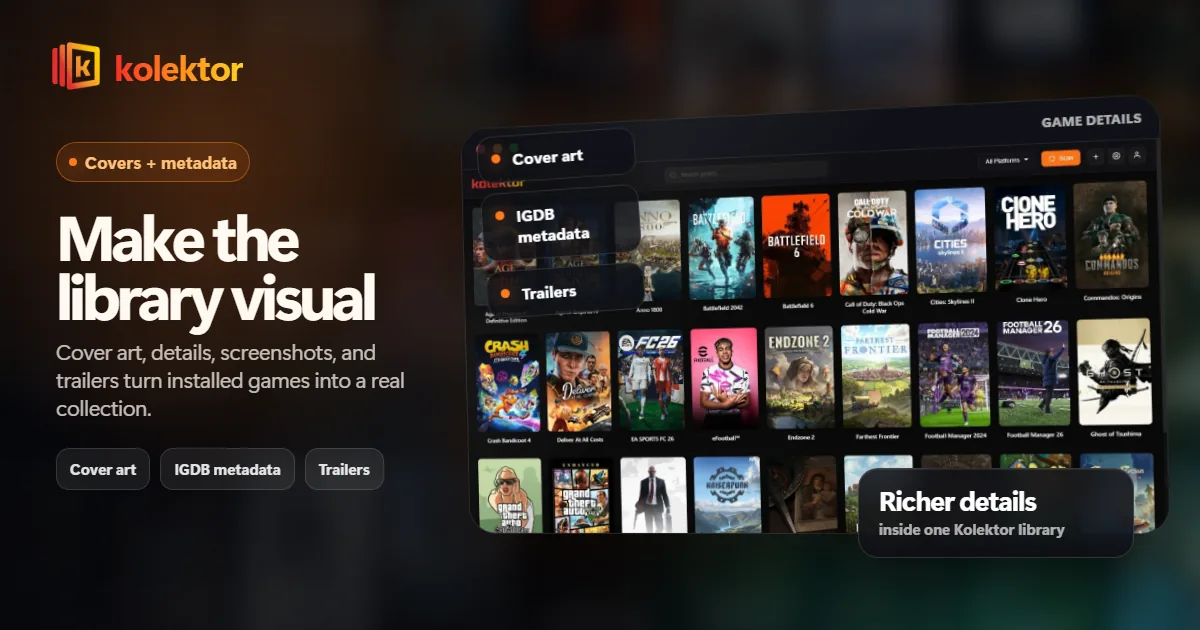
A PC game launcher is easier to use when the library looks like a collection, not a spreadsheet. Kolektor uses cover art, metadata, game details, screenshots, and trailers to make installed games easier to recognize, browse, and launch.
Why Covers Matter
Most players do not remember games by executable names. They remember covers, logos, characters, colors, and the feeling of seeing the game in a library. That is why a folder of shortcuts feels worse than a visual grid even when both launch the same files.
Cover art turns a library into something scannable. You can look across a grid and spot games you forgot, games you paused, games you meant to finish, and games that belong to a certain mood. Text search is useful when you know what you want. Visual browsing is useful when you do not.
Kolektor treats cover art as part of the launcher experience because the library should help you choose, not just execute.
Metadata Makes The Library Understandable
Metadata is the layer that gives a game more context than its title. Details, screenshots, trailers, and descriptions help a library answer questions before you leave the launcher.
That matters when the collection gets large. A title alone may not tell you whether a game is a city builder, a short platformer, a long RPG, a local co-op game, or something you installed months ago and forgot.
Kolektor beta 4 added IGDB integration for cover art and rich metadata, plus a Game Details panel. Those features support the bigger goal: make the library useful as a collection, not only as a list of launch targets.
What A Useful Game Detail View Should Answer
A good details view should not try to replace the store page. It should answer the questions that matter when deciding what to play.
| Question | Why it helps |
|---|---|
| What game is this? | Cover, title, and platform identity make the game recognizable |
| Why did I install it? | Description, screenshots, and trailers refresh your memory |
| Where does it launch from? | Platform context prevents confusion across stores |
| Is this the version I want? | Manual entries and platform badges can separate variants |
| Do I want to play it now? | Visual context helps with quick selection |
The point is not to overload the library. The point is to show enough context to make the next action easier.
Want a PC library that is easier to browse visually? Use Kolektor to scan your installed games and view them as a collection.
Download KolektorWhere Metadata Fits In The Flow
The launcher flow should stay simple:
- Kolektor detects installed games from supported platforms.
- The library grid gives you a visual overview.
- Cover art helps you recognize games quickly.
- Details, screenshots, and trailers provide extra context.
- One-click launch moves you from browsing to playing.
That flow keeps metadata in the right role. It supports the decision, but it does not become a second store page full of noise.
Why This Matters For Multi-Platform Libraries
Metadata is especially valuable when a game collection spans several platforms. Steam, Epic, GOG, Xbox Game Pass, Ubisoft, EA, Battle.net, and Amazon Games all present libraries differently. Some are visual, some are store-first, some are subscription-first, and some are mostly a launch surface for specific publishers.
Kolektor gives those installed games one visual language. The platform still matters, but the browsing habit becomes consistent. You do not need to remember where a game lives before deciding whether you want to play it.
That consistency is the reason cover art and metadata belong in a unified launcher. The goal is not only to reduce launcher clutter. It is to make the collection feel coherent.
Metadata Also Improves Search
Search is better when the library has clean titles and recognizable entries. A folder path or executable name may technically identify a game, but it is not always the name a player remembers.
This matters for sequels, remasters, editions, subtitles, and older PC games. If the visible library uses better titles and covers, the user can search naturally instead of remembering the exact install folder. That is one of the practical reasons metadata belongs inside the launcher rather than only on store pages.
Kolektor’s role is to make installed games easier to find in the moment before playing. Metadata supports that moment by making the library more searchable, more scannable, and less dependent on memory.
Store Pages Are Not Enough
Every store already has its own way to show game art and details. The problem is that those details stay trapped inside separate launchers. If your library spans eight platforms, the visual context is split across eight places.
Kolektor gives installed games one visual surface. That does not remove the value of store pages; it changes when you need them. Use store pages for purchases, updates, DLC, reviews, and account-specific features. Use Kolektor when you want to see what is installed and decide what to play.
This distinction keeps the library practical. It avoids pretending that a launcher must replace every platform feature while still solving the browsing problem that scattered platforms create.
What Happens When Metadata Is Missing
Metadata is helpful, but it should never block launching. If a cover or detail is missing, the game should still be manageable. You should still be able to find it, launch it, and manually improve the entry when needed.
This is important because PC libraries are messy. Games can have unusual names, regional titles, fan patches, test builds, or standalone executables that do not match cleanly against a metadata source. A good launcher should gracefully handle those cases instead of making the library feel broken.
Kolektor’s manual add and edit flows matter here. A library should let the user correct the edge cases that automatic systems cannot infer perfectly.
Metadata Without Bloat
Not every piece of data belongs in the first screen. A launcher should not slow the user down with too much information before every play session.
Useful metadata usually follows this order:
- Cover art in the grid.
- Title and platform identity where needed.
- Search and filters for fast lookup.
- Details when the user opens a game.
- Screenshots or trailers when the user wants extra context.
That hierarchy keeps the library fast. The grid stays visual. The details view handles deeper context. The launch action stays close.
For Collectors, Visual Memory Matters
Kolektor is starting with the free game launcher, but the broader product direction is collection management. That makes cover art and metadata more important, not less.
Collectors do not only want to launch games. They want to understand what they own, what is installed, what is worth revisiting, and what belongs in the collection long term. A visual library is the first step toward that.
Full Library Sync is a Free feature we are building alongside the launcher. Subscription catalogs, bulk manual import, and advanced collection tools are Premium features being developed separately. The same principle applies to both: a collection is easier to use when it is visual and structured.
FAQ
Does Kolektor use game metadata?
Yes. Kolektor beta 4 added IGDB integration for cover art and rich metadata, plus game details, screenshots, and trailers.
Is cover art required to launch a game?
No. Cover art makes the library easier to browse, but launching should not depend on perfect metadata.
Can metadata be wrong?
Any metadata match can have edge cases, especially with unusual installs, fan projects, or renamed games. Manual edit flows are important for fixing those cases.
Why not just use the store page?
Store pages are useful for buying, updating, and account features. Kolektor’s metadata is for the library moment: recognizing installed games and deciding what to play.
Related Guides
- Automatic game detection on Windows
- Add non-Steam games to one PC library
- Organize Steam, Epic, and GOG games
- Download Kolektor
Try Kolektor for your PC library
Kolektor Core is free, including automatic detection, one-click launching, cover art, a unified view across major PC game platforms, and Full Library Sync.
See Your Library in Kolektor